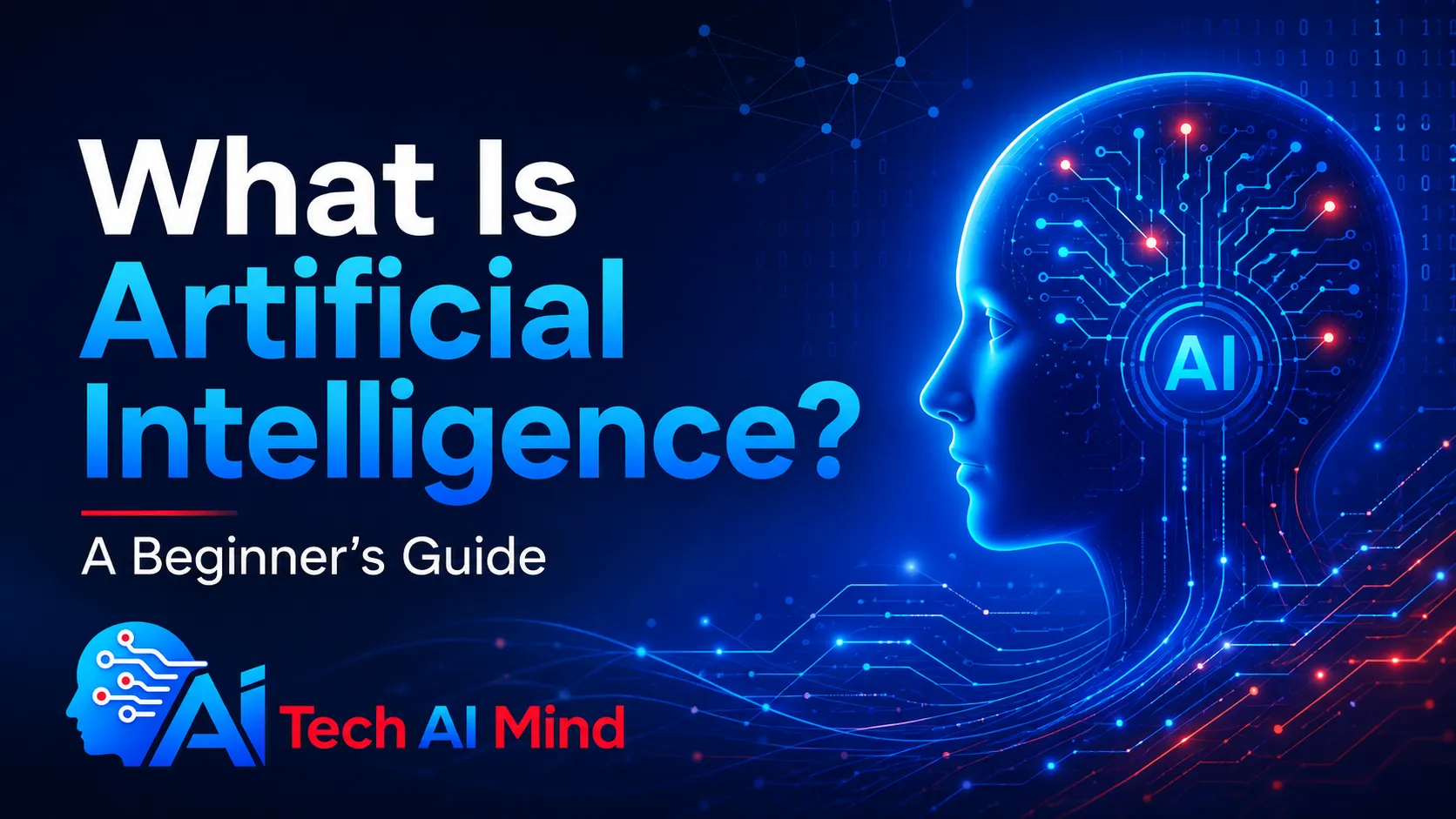
Artificial intelligence is now part of everyday technology, from search engines and smartphones to writing tools, recommendation systems, customer support, and business software. But what is artificial intelligence, and what does AI actually do?
Artificial intelligence, or AI, is technology that allows computers and machines to perform tasks that normally require human intelligence. These tasks can include understanding language, recognizing images, finding patterns, making predictions, solving problems, and creating new content.
You do not need to understand advanced computer science to understand AI. This beginner-friendly guide explains how artificial intelligence works, the different types of AI, common examples, benefits, risks, and how you can start using AI responsibly.
Table of Contents
What Is Artificial Intelligence?
Artificial intelligence is a broad field of computer science focused on building systems that can perform tasks associated with human intelligence.
According to IBM’s explanation of artificial intelligence, AI enables computers and machines to perform activities such as learning, problem-solving, decision-making, comprehension, and creativity.
In simple terms:
AI allows computers to analyze information, recognize patterns, and produce useful results without a human manually giving an instruction for every possible situation.
For example, an AI system may be able to:
- Answer questions
- Recognize objects in photographs
- Translate languages
- Recommend products
- Detect spam
- Summarize documents
- Generate images
- Write or explain computer code
- Analyze large amounts of data
- Predict possible outcomes
AI is an umbrella term. Technologies such as machine learning, deep learning, natural language processing, computer vision, generative AI, and AI agents all belong to or closely support the wider field of artificial intelligence.
Artificial Intelligence in Simple Words
If you want the shortest answer to what is artificial intelligence, think of it this way:
Artificial intelligence is technology that helps machines perform intelligent tasks using data, algorithms, and learned patterns.
Traditional computer programs usually follow rules written in advance.
For example:
Traditional software:
If a customer clicks Buy → open checkout.
AI can handle more complex and less predictable information.
For example:
AI system:
Read a customer message → understand the question → determine the topic → suggest an appropriate response.
The second task requires the system to interpret information instead of simply following one fixed instruction.
How Does Artificial Intelligence Work?
There is no single way all AI systems work.
However, many modern AI systems depend on four basic elements:
- Data
- Algorithms
- Models
- Computing power
Here is a simplified explanation.
Step 1: The System Receives Data
AI systems learn or operate using information.
That information can include:
- Text
- Images
- Videos
- Audio
- Numbers
- Sensor readings
- Computer code
- Business records
The type and quality of data depend on what the AI is designed to do.
An image recognition system needs image data, while a language model learns patterns from large amounts of language-related data.
Step 2: Algorithms Find Patterns
Algorithms are sets of mathematical processes or instructions used to analyze information.
Instead of a programmer manually creating a rule for every possible situation, some AI systems learn patterns from examples.
For instance, a system trained to distinguish cats from dogs can learn visual patterns associated with each category.
Step 3: An AI Model Is Created
The learning process produces a model.
The model is the part of the AI system that uses learned relationships to process new information.
You might enter:
Summarize this paragraph in three sentences.
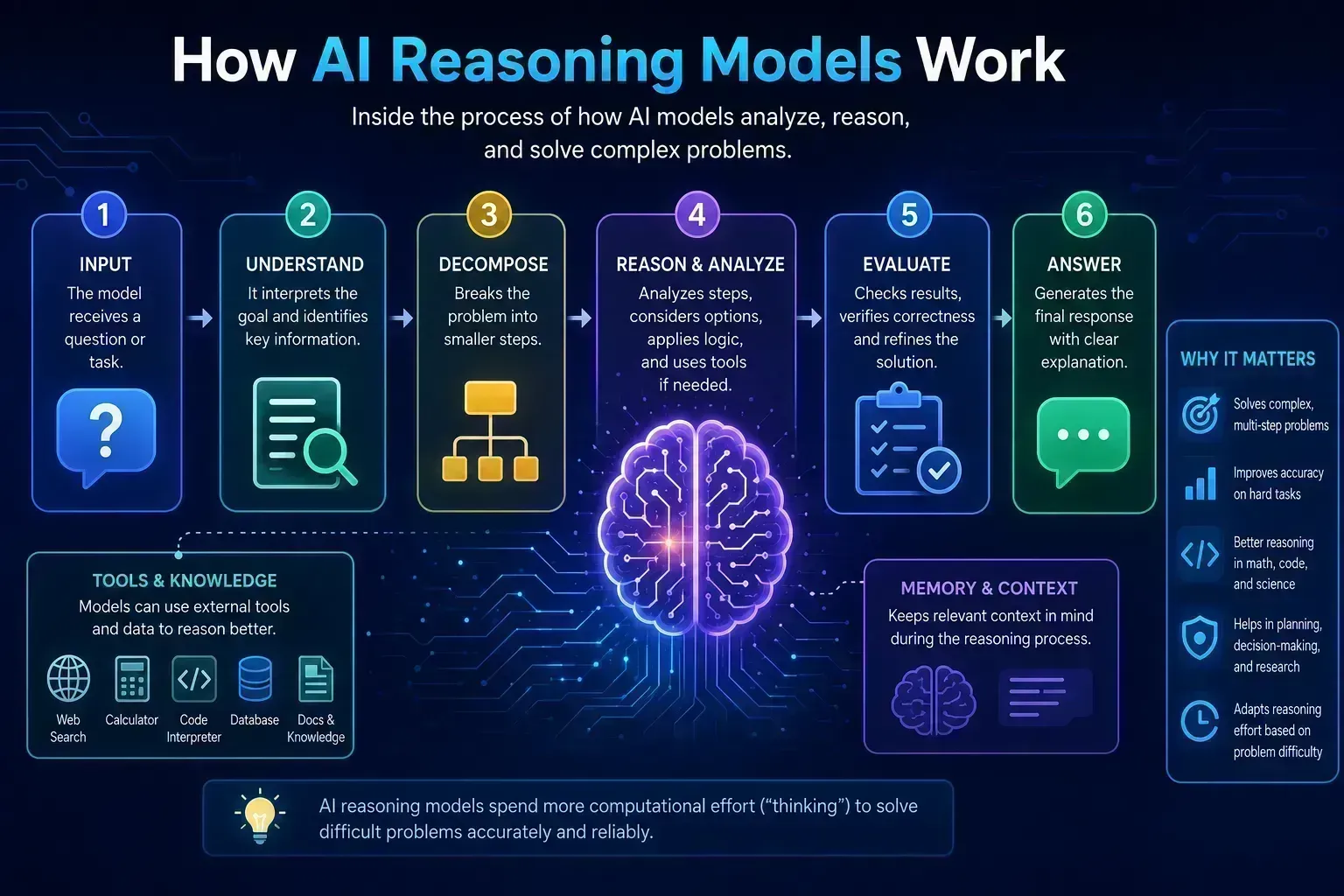
The model analyzes the request and produces an output based on patterns learned during training.
Step 4: AI Generates an Output
Different AI systems generate different types of results.
An output could be:
- An answer
- A prediction
- A recommendation
- A classification
- An image
- A translation
- A summary
- A piece of code
Modern AI systems can often create these outputs within seconds.
What Is Machine Learning?
Machine learning, or ML, is one of the technologies used to create artificial intelligence systems.
Instead of programming every rule manually, developers can train a machine learning model using data.
The model learns patterns and uses them to make predictions or decisions about new information.
Common uses of machine learning include:
- Email spam filtering
- Fraud detection
- Product recommendations
- Search systems
- Image recognition
- Customer behavior analysis
- Predictive maintenance
- Cybersecurity monitoring
Artificial intelligence and machine learning are related, but they are not exactly the same.
AI is the broader field. Machine learning is one method used to build AI systems.
What Is Deep Learning?
Deep learning is a more specialized area of machine learning.
It uses computational structures called artificial neural networks.
These systems contain layers that process information and learn increasingly complex patterns.
Deep learning has contributed to advances in:
- Image recognition
- Speech recognition
- Natural language processing
- Computer vision
- Generative AI
- Autonomous systems
Many modern AI applications use deep-learning techniques behind the scenes.
What Is Generative AI?
Generative AI is a type of artificial intelligence designed to create new content.
According to Google Cloud’s explanation of generative AI, generative models can produce content such as text, images, videos, and summaries based on patterns found in training data.
Generative AI can create:
- Text
- Images
- Video
- Audio
- Computer code
- Presentations
- Summaries
For example, you could ask an AI system:
Create a simple explanation of cloud computing for a beginner.
The AI analyzes your prompt and generates a new response.
Generative AI is commonly used for:
- Writing assistance
- Brainstorming
- Research
- Marketing
- Design
- Programming
- Customer support
- Productivity
Read our generative AI guide to understand how this technology differs from traditional AI.
What Is a Large Language Model?
A large language model, usually shortened to LLM, is an AI model designed to understand and generate language.
Google Cloud describes an LLM as a statistical language model trained on very large amounts of data that can be used for tasks such as generating and translating text.
LLMs can help with tasks including:
- Answering questions
- Writing
- Summarizing
- Translation
- Research assistance
- Coding
- Brainstorming
- Document analysis
They work by learning statistical relationships in language and predicting useful sequences of words or other tokens.
An important point for beginners is that an LLM can produce a convincing answer without guaranteeing that the answer is correct.
That is why important AI-generated information should be checked against reliable sources.
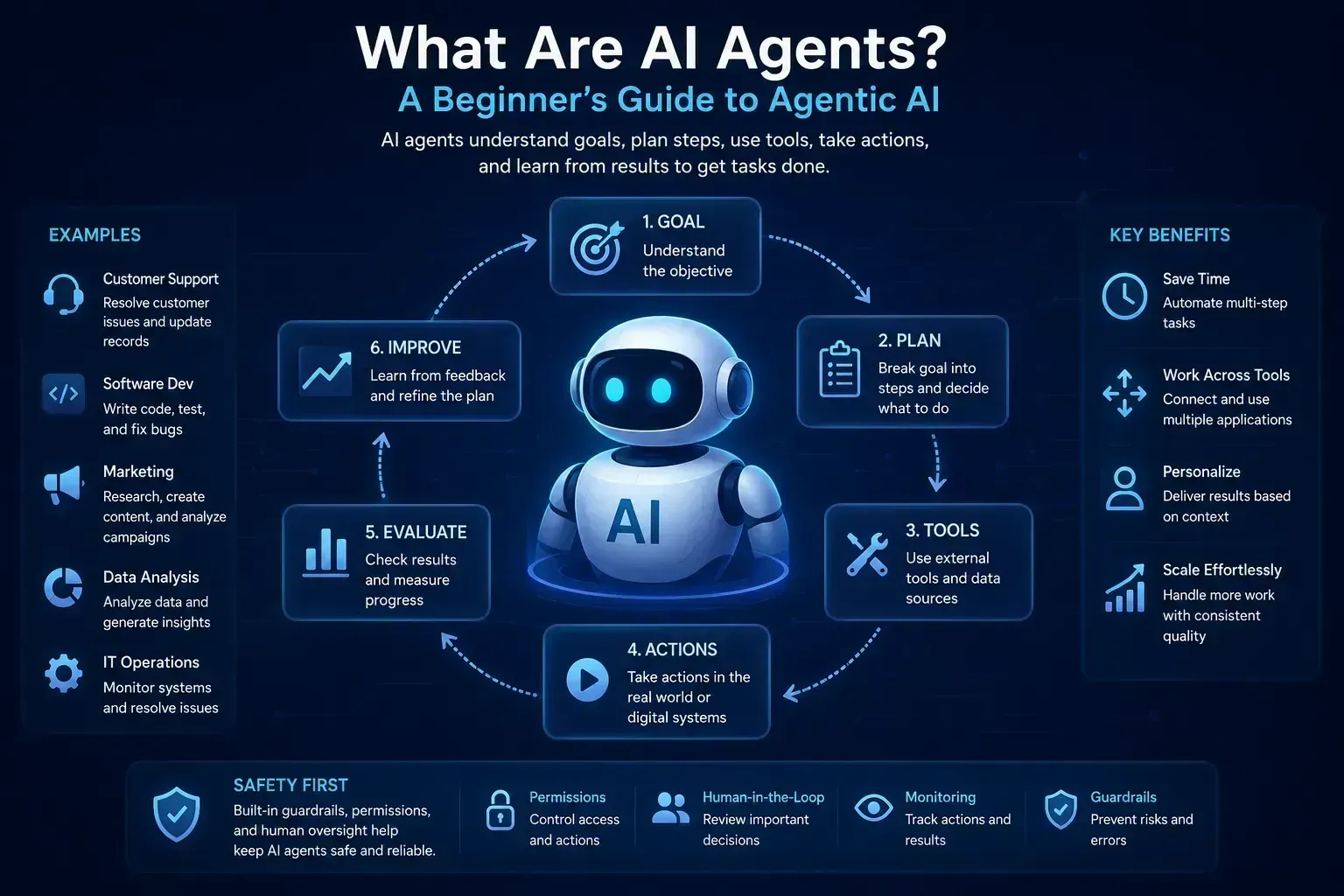
What Are AI Agents?
AI agents take artificial intelligence beyond simple question-and-answer interactions.
An AI agent is generally designed to pursue a goal, make decisions about intermediate steps, and potentially use tools to complete a task.
Google Cloud describes modern AI agents as systems that can use models such as LLMs to understand information, reason about tasks, and take actions.
A basic chatbot interaction might look like this:
You ask → AI answers.
An agentic workflow may look more like this:
You provide a goal → AI creates steps → AI uses tools → AI checks results → AI continues working toward the goal.
For example, an AI agent might:
- Research several products.
- Extract important specifications.
- Compare the options.
- Create a table.
- Summarize the findings.
Learn more in our beginner’s guide to what AI agents are.
Types of Artificial Intelligence
You may see artificial intelligence divided into several categories.
The terminology can vary because AI is a fast-changing field. IBM notes that AI types are often discussed according to their capabilities and functionality.
For beginners, three terms are especially useful to understand.
1. Narrow AI
Narrow AI is designed to perform a specific task or a limited range of tasks.
Examples can include:
- Recommendation engines
- Spam filters
- AI writing assistants
- Image recognition tools
- Navigation systems
- Voice recognition
Most practical AI systems people use today fall into specialized rather than human-level general intelligence categories.
2. Artificial General Intelligence
Artificial general intelligence, commonly called AGI, describes the idea of an AI system capable of performing a very broad range of intellectual tasks.
AGI should not be confused with ordinary AI tools available today.
It remains an area of research and debate.
3. Artificial Superintelligence
Artificial superintelligence is a hypothetical concept describing AI that would exceed human intellectual capability across a broad range of activities.
It is not the same as today’s AI tools.
Examples of Artificial Intelligence in Everyday Life
Artificial intelligence is not limited to futuristic robots.
You probably already interact with AI-powered technology.
Search Engines
Search systems use machine learning and other automated technologies to understand queries and organize relevant information.
Recommendation Systems
Streaming services, online stores, and digital platforms can analyze behavior and other signals to suggest:
- Movies
- Music
- Products
- Videos
- Articles
Smartphones
Your smartphone may use AI for:
- Camera processing
- Predictive typing
- Voice recognition
- Photo organization
- Translation
- Battery optimization
Email services can use machine learning to identify spam, suspicious messages, and unwanted content.
Navigation Apps
Mapping applications process location, road, and traffic information to recommend routes.
Online Shopping
AI can help ecommerce businesses with:
- Product recommendations
- Search
- Customer support
- Fraud detection
- Inventory forecasting
Social Media
Social platforms use automated systems for activities such as:
- Content recommendations
- Feed ranking
- Spam detection
- Image analysis
- Content moderation support
Customer Service
AI chat systems can answer common questions and help route customers to appropriate support resources.
Cybersecurity
AI and machine learning can help security systems identify unusual behavior and detect patterns that may indicate threats.
Where Is Artificial Intelligence Used?
AI is now used across many industries.
Business
Businesses can use AI for:
- Data analysis
- Customer service
- Marketing
- Sales
- Automation
- Forecasting
- Document processing
IBM describes modern business AI as including technologies such as machine learning, natural language processing, generative AI, predictive analytics, and computer vision.
Marketing
AI tools may help marketers:
- Analyze customer data
- Generate ideas
- Draft content
- Segment audiences
- Automate workflows
- Analyze campaign performance
Explore our guide to the best AI marketing tools.
Content Creation
AI can support:
- Research
- Outlining
- Editing
- Image generation
- Video production
- Content repurposing
AI-generated material should still be reviewed for accuracy, originality, usefulness, and context.
Software Development
Developers may use artificial intelligence to:
- Explain code
- Generate code suggestions
- Find bugs
- Create tests
- Write documentation
- Explore solutions
See our upcoming guide to the best AI coding assistants.
Education
Students and educators may use AI to:
- Explain concepts
- Generate practice questions
- Create study plans
- Summarize information
- Explore alternative explanations
AI is most useful when it supports learning instead of simply replacing the learning process.
Benefits of Artificial Intelligence
AI offers several potential advantages.
Saves Time
Artificial intelligence can speed up repetitive work such as:
- Organizing information
- Summarizing text
- Categorizing data
- Drafting documents
- Searching large datasets
Improves Productivity
AI assistants can help users complete certain tasks faster.
For practical options, see our guide to the best AI productivity tools.
Handles Large Amounts of Information
Computers can process far more data than a person could manually review in the same amount of time.
This makes AI useful for finding patterns in large datasets.
Supports Accessibility
AI-powered features can support accessibility through:
- Speech-to-text
- Text-to-speech
- Live captions
- Translation
- Image descriptions
Helps Automate Repetitive Work
AI can work alongside traditional automation to handle tasks that require some interpretation of text, images, or other less-structured data.
Risks and Limitations of Artificial Intelligence
AI can be useful, but responsible use matters.
Organizations such as the U.S. National Institute of Standards and Technology have developed frameworks specifically to help organizations understand and manage AI-related risks.
The OECD AI Principles also emphasize trustworthy AI and responsible use.
Here are several limitations ordinary users should understand.
AI Can Give Incorrect Answers
An AI model can produce inaccurate or invented information.
This is often described as an AI hallucination.
A polished answer is not automatically a factual answer.
Check important information against trustworthy sources.
AI Can Reflect Bias
Models learn from data.
If the underlying data or development process contains bias, those problems can affect AI outputs.
Privacy Matters
Be careful about what you enter into an AI service.
Avoid sharing sensitive information such as:
- Passwords
- Bank account details
- Private customer information
- Confidential business documents
- Secret API keys
- Personal identification information
unless you understand how the service processes and protects that information.
Learn more in our guide to AI data privacy.
AI May Miss Important Context
Humans understand cultural, emotional, professional, and situational context in ways an AI system may not.
This can lead to incomplete or inappropriate answers.
AI Should Not Automatically Make High-Stakes Decisions
AI can support decision-making, but users should be especially careful with important:
- Medical decisions
- Legal questions
- Financial decisions
- Employment decisions
- Security decisions
Human expertise and accountability remain important.
Artificial Intelligence vs Machine Learning
These two terms are often confused.
| Artificial Intelligence | Machine Learning |
|---|---|
| Broad field of intelligent computer systems | Subfield or approach within AI |
| Includes many different technologies | Focuses on learning patterns from data |
| Can involve reasoning, language, vision, generation, and automation | Often used for prediction and classification |
| AI is the larger concept | ML is one way to build AI |
A simple way to remember it is:
Machine learning is part of artificial intelligence, but not every AI concept can be explained only as machine learning.
Artificial Intelligence vs Automation
AI and automation are also different.
Traditional Automation
Traditional automation follows predefined rules.
Example:
When an order is completed, send the customer a confirmation email.
AI-Powered Automation
AI can interpret information before deciding what action should happen.
Example:
Read a customer support request, understand the problem, classify its urgency, and route it to the correct department.
The ability to work with less-structured information makes AI useful in more flexible automation workflows.
AI vs Robots: Are They the Same?
No.
AI is not the same as a robot.
Artificial intelligence usually refers to software, models, and computational systems.
A robot is a physical machine.
Some robots use AI, but many AI systems have no physical body at all.
An AI assistant running in your browser is artificial intelligence even though there is no robot involved.
How Can a Beginner Start Using Artificial Intelligence?
Getting started with AI does not require coding skills.
Follow these simple steps.
1. Choose One Real Problem
Do not start by trying every AI tool you can find.
Choose a useful task.
For example:
- Summarize a long document
- Brainstorm article ideas
- Improve an email
- Explain a difficult concept
- Organize notes
- Create an outline
2. Choose the Right Tool
Different tools are designed for different jobs.
AI tools may specialize in:
- Writing
- Research
- Coding
- Images
- Video
- Meetings
- Automation
- Data analysis
Our how to choose an AI tool guide can help you compare them.
3. Give Clear Instructions
AI generally produces better results when you give it useful context.
A weak prompt might be:
Tell me about hosting.
A clearer prompt would be:
Explain web hosting to a beginner in simple English. Include shared hosting, VPS hosting, cloud hosting, domains, DNS, and SSL.
Tell the AI:
- What you want
- Who the answer is for
- What format to use
- What information matters
- What it should avoid
4. Check the Answer
Do not automatically publish or act on AI-generated information.
Check:
- Names
- Dates
- Statistics
- Prices
- Technical specifications
- Quotes
- Links
- Important factual claims
Use primary or authoritative sources whenever possible.
5. Protect Your Data
Read the service’s privacy and data-use information before uploading sensitive material.
This is especially important for business, customer, financial, legal, or confidential information.
How to Choose an AI Tool
Before paying for an AI product, ask these questions:
What problem does it solve?
A tool should solve a genuine problem rather than simply having impressive features.
Who is it designed for?
An AI coding platform may be excellent for developers but unnecessary for someone who only needs writing help.
Is there a free version?
A trial or free tier can help you determine whether the tool fits your workflow before paying.
What are the usage limits?
Check for:
- Message limits
- Credit limits
- File limits
- Storage limits
- Model restrictions
How does it handle your data?
Review privacy and security information, especially when dealing with business documents.
Does it integrate with your existing software?
Integrations can significantly improve the value of AI for productivity and automation.
Is Artificial Intelligence Safe?
There is no universal yes-or-no answer.
AI safety depends on:
- The system
- The data
- The task
- The user
- Security controls
- Human oversight
- How the output is used
NIST’s AI Risk Management Framework emphasizes managing AI risks across the lifecycle of an AI system rather than treating safety as a single feature.
For everyday users, a practical approach is:
Use AI as an assistant, protect private information, verify important claims, and keep humans involved in important decisions.
Can Artificial Intelligence Replace Humans?
AI can automate parts of many jobs, but jobs are made up of many different tasks.
Some tasks are easier to automate than others.
AI can be especially useful for:
- Repetitive work
- Data processing
- Classification
- Drafting
- Searching information
- Pattern recognition
Humans remain especially important for:
- Accountability
- Judgment
- Leadership
- Empathy
- Negotiation
- Ethical decisions
- Complex real-world context
- Relationship building
For many people, the useful question is therefore not simply:
Will AI replace me?
A better question may be:
Which parts of my work can AI help me do faster or better?
Key Takeaways
- Artificial intelligence allows computers to perform tasks associated with human intelligence.
- AI can understand language, identify patterns, generate content, make predictions, and support automation.
- Machine learning is one of the main technologies used to develop AI systems.
- Generative AI creates new content such as text, images, video, audio, and code.
- Large language models specialize in understanding and generating language.
- AI agents can go beyond simple answers and work through multi-step tasks.
- AI is already used in smartphones, search, ecommerce, business software, cybersecurity, and everyday applications.
- AI can save time and improve productivity, but its answers are not automatically correct.
- Privacy, accuracy, security, bias, and human oversight are important considerations.
- Beginners should start with simple tasks, verify important information, and avoid sharing sensitive data unnecessarily.
Conclusion: What Is Artificial Intelligence?
So, what is artificial intelligence?
Artificial intelligence is technology that allows computers to analyze information, recognize patterns, generate content, make predictions, and perform tasks that traditionally required aspects of human intelligence.
AI includes technologies such as machine learning, deep learning, generative AI, large language models, computer vision, and increasingly capable AI agents.
It is already built into many tools people use every day, from smartphones and search engines to business software and digital assistants.
However, artificial intelligence should not be treated as an unlimited or perfectly accurate source of knowledge. AI systems can make mistakes, misunderstand context, reflect bias, and create privacy or security concerns. Responsible frameworks from organizations such as NIST and the OECD emphasize the importance of trustworthy and responsible AI use.
For beginners, the best approach is simple: use AI as a tool, not as unquestionable truth. Start with useful tasks, give clear instructions, verify important information, and protect your data.
2 thoughts on “What Is Artificial Intelligence? A Beginner’s Guide”